Try it live
Two first-party host applications built on Affiant run in public: Meridian, an aircraft-maintenance desk, and HR Portal, a small HR department. Each opens its AI agent in a resizable panel on the right, from a floating button in the corner; the rail down the side is the app’s own navigation. Everything either agent proposes to write is filed and arrives as an Evidence Card, and nothing reaches either app’s own records until that proposal has been approved — by a reviewer on the card, or by a standing order a person wrote in advance. That moment is what the demos exist to show — and because the two apps sit on different backends and different docket stores, together they show that the moment depends on neither.
Both apps say so in their header bar: they are demo apps built to show Affiant at work, not products.
Before you start
Section titled “Before you start”- Sign-in. Each demo opens on a sign-in page, and the one-time code it asks for arrives by email. Enter any email address, paste the code it sends you, and you are in for 24 hours. There is no password and no account to create.
- Five messages a day, per person, per demo. The sixth is refused until 00:00 UTC. Each demo also has daily ceilings of its own across everyone using it: once one is reached, a further message — or a first sign-in — is refused until the same reset. Spend yours on the prompts below.
- Shared, synthetic data, and none of it keeps. Every visitor works on the same seeded data. Each app runs in a container that sleeps after fifteen idle minutes and is destroyed outright every night at 00:00 UTC; the disk is ephemeral either way, so the next request after one of those starts a fresh, reseeded app — chat history and any cards you left pending go with each reset. A pending card can also lapse before either of those on the app’s own docket deadline: thirty minutes in Meridian, fifteen in HR Portal. Deciding on a lapsed card is refused rather than applied. Treat it all as a shared whiteboard: don’t type anything real into it.
- It may need a moment. After a quiet spell the first visit takes a few seconds to wake — that spell is the same fifteen minutes.
- Seats are finite. At most fifty people can hold a seat at a time, across both demos together. A seat is claimed by each person who signs in and released only after 31 idle days, never by signing out. A first sign-in can be refused for either of two reasons: the fifty seats are taken, or that demo’s own daily ceiling on new people has been reached for the day.
- Say what you think. Every reply has a thumbs-up and thumbs-down; the comments reach the maintainers.
Meridian
Section titled “Meridian”Meridian is an aircraft-maintenance application — a fleet of ten aircraft, their work orders, and a parts inventory — at meridian.affiant.dev. Ask its agent to raise a work order and the proposal comes back as a card.
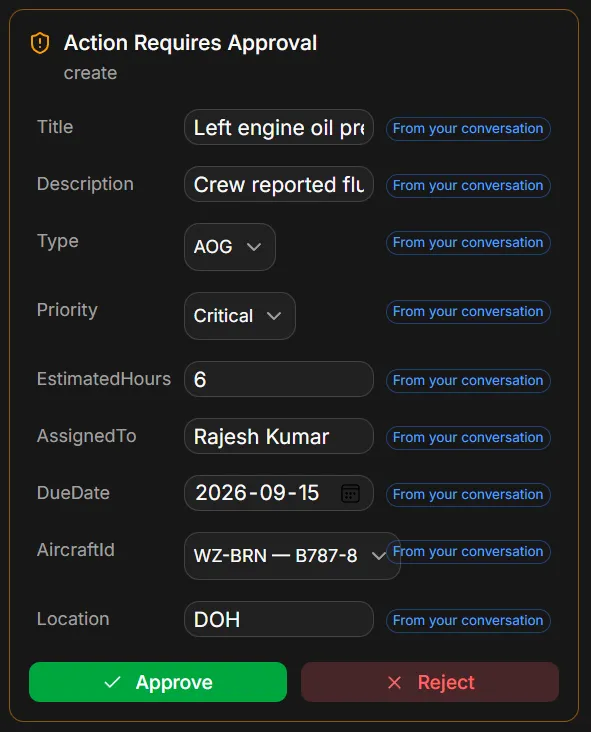
Captured on 2026-09-10 from the live demo, running 1.0.0-beta.3.1. The prompt behind it is longer than the
one in the table below:
Create an AOG work order for WZ-BRN. Title: Left engine oil pressure fluctuation. Description: Crew reported fluctuating oil pressure on the left engine during climb; inspect the oil system and the pressure transmitter and replace as required. Priority Critical, estimated 6 hours, assign it to Rajesh Kumar, due 2026-09-15.
Every one of the nine fields carries From your conversation. AircraftId shows WZ-BRN — B787-8 and
Location shows DOH, each resolved from the aircraft already established in this conversation — the
same rung, which covers a value that came out of what was said or out of a tool result rather than out of the
model.
What to try
Section titled “What to try”| Say | What happens | What it shows |
|---|---|---|
Show me all AOG aircraft |
The agent calls a read tool and answers from the fleet. | A read tool returning a dual-audience result. |
What work orders are overdue? |
Another read. Neither read tool filters on a due date: the search marks an overdue row in its result, and a statistics tool reports the count. | Same contract, a second tool. |
Create an AOG work order for the left engine on WZ-BRN |
The agent drafts the work order and an Evidence Card appears. Nothing is written yet. | The Docket and Evidence Cards, the Review Gate, and Rule 3 — write tools never write. |
| (on the card) type a new value into a field, then Approve | The write executes with your amendment on the record. | A reviewer’s correction is appended to the affidavit, and the tag it displaced stays behind it on the record. |
Guide me through creating a work order |
The app navigates to the form and walks you through it field by field. | Rule 6: the agent guides the UI through a registry, never by inspecting the DOM. |
Is part PN-CFM56-OIL-001 available? |
A stock check. | A read tool against inventory. |
HR Portal
Section titled “HR Portal”HR Portal is a small HR department — an employee directory, leave requests, expense reports, and an approvals inbox — at hrportal.affiant.dev. Its agent works on one employee at a time: find them first, then ask for a change on their behalf.
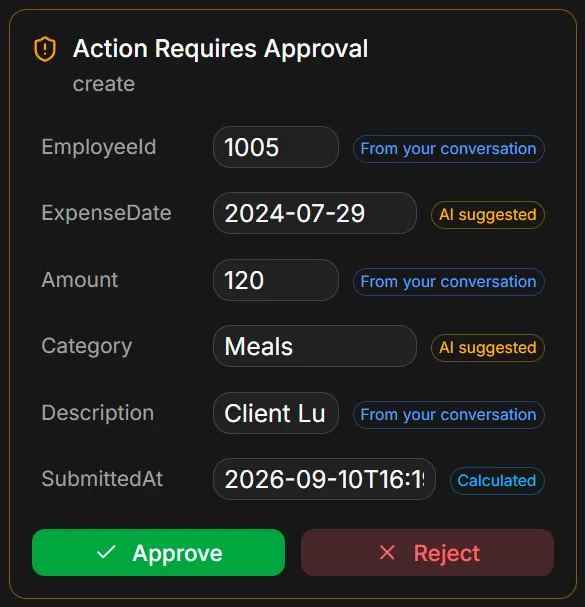
Captured on 2026-09-10 from the live demo, running 1.0.0-beta.3.1, from the expense-report prompt below,
after the employee lookup earlier in the same conversation.
This card is the same rule read the other way. Amount (120) and Description (the client lunch) are in
what was typed, and EmployeeId (1005) is the employee the agent had already looked up in the same
conversation, so all three carry From your conversation. Nobody said a date or a category: the model
supplied 2024-07-29 and Meals, and both carry AI suggested rather than being sworn as the person’s
words. SubmittedAt is the host’s own clock, Calculated.
What to try
Section titled “What to try”| Say | What happens | What it shows |
|---|---|---|
Find employee Priya Nair |
The agent searches the directory and remembers who “her” means for the rest of the conversation. | A read tool. For leave and profile changes the host goes further: a write with no search before it is sent back to search first, so the agent does not guess an identifier. |
Submit an expense report of 120 dollars for a client lunch for Priya Nair |
The agent drafts the report and an Evidence Card appears. Nothing is written yet. | The same Docket and Review Gate on a different backend. |
| (on the card) type a new value into a field, then Approve | The write executes with your amendment on the record, tagged UserStated at confidence 1. |
The reviewer’s tag goes in force unconditionally — a correction is not a confidence contest it can lose to the model. |
Request 3 days of annual leave for Priya Nair starting next Monday |
Another Evidence Card: this leave request wants a reviewer’s confirmation. | A policy the host built on Affiant.Policies, deciding what the write needs before the entry is even filed. |
Request 1 day of sick leave for Priya Nair tomorrow |
Nobody is asked to confirm: a standing order approves it on the spot and the leave is written. A card still arrives — the framework marks it as needing no confirmation, and the demo’s card does not show that, so it looks like any other. | A policy that pre-approves one class of write — a day of sick leave — so the routine case skips the queue. The entry is still filed, attested to the policy that fired. |
Update Priya Nair's email to [email protected] |
An Evidence Card for a one-field change. | The same gate on the smallest write. |
What you are looking at
Section titled “What you are looking at”The card is an Evidence Card: the rendering of an Affidavit, one row per field the agent proposes to write. Each row carries a badge naming where its value came from. Both apps spell the provenance ladder out in the same plain words:
| Badge | ProvenanceSource | Meaning |
|---|---|---|
| You said this | UserStated |
The user said it, in so many words. |
| Looked up | External |
Read from a system of record. |
| Calculated | Computed |
Derived deterministically from trusted inputs. |
| From your conversation | Conversation |
The value is in what was said — literally in the turn, or in a tool result. |
| AI suggested | Inferred |
The model’s best guess, sworn as exactly that. |
| System default | Default |
A fallback value no one supplied. |
| Not derived — please verify | Empty |
Provenance unknown, marked rather than left out. It counts as 0, so the write’s aggregate confidence is 0. |
Three of those rungs are on the two cards above: From your conversation on every Meridian field and on three of HR Portal’s, AI suggested on the two HR Portal fields nobody supplied, and Calculated on its submission timestamp. You said this is on neither card, and on these demos it is the reviewer’s rung: a field you amend before approving. No write tool in either app may swear a value the model supplied as something you said.
Approve and Reject are the Review Gate from the reviewer’s
side. A required field still Not derived is shown as exactly that and drags the aggregate confidence to 0, and
both demo cards go further than the framework does: Approve is disabled while a required field is blank —
“Required fields are missing values” — until you type a value into it. The framework flags the hole and leaves
that decision to the host; what it blocks on its own is a standing order over an empty mandatory field — that
verdict degrades to a reviewer’s confirmation, so a person is asked instead. Set a new value before approving
and it is recorded UserStated at confidence 1, bound to the decision you made it on, and on every field you
change the reviewer’s tag goes in force while the model’s stays behind it in the chain — the reviewer’s word
outranks the model’s. Clearing a field is something the framework has semantics for and these cards do not
reach: an emptied input is sent as an empty string, which is a value, so a clear never leaves the demo.
Meridian’s guided walkthrough is Rule 6 in the open: the agent knows which form fields exist because the UI registered them, not because it read the page.
What they run on
Section titled “What they run on”Both apps are .NET 10 and React, talking over SignalR, with Gemini 2.5 Flash as the model, hosted on
Cloudflare. Their tools are ordinary C# classes: on both of the backends they use,
AffiantToolCatalog.FromType<T>() reflects over a type’s public instance methods — skipping generic method
definitions, members declared on object, and property and event accessors, and refusing an overloaded name
outright — and asks for no marker attribute to make one a read tool. A write tool is the exception:
[AffiantWriteTool] is what declares it write-capable, and its three arguments are the operation the
descriptor carries ("WriteCreate", "WriteUpdate"), the entity type, and the inference strategy. Without it
the descriptor is built as a read query — the pre-tool inference is skipped as not_a_write_tool, and nothing
holds the tool to returning a proposal. Every write tool behind the cards above carries it. The
quickstart builds the same kind of tool in the Semantic Kernel shape instead, where a
[KernelFunction] attribute marks each one. Where the two apps differ is the point:
| Meridian | HR Portal | |
|---|---|---|
| Backend | Microsoft Agent Framework, through Affiant.AgentFramework |
IChatClient directly, through Affiant.Extensions.AI |
| Docket store | Affiant.Docket, in memory |
Affiant.Docket persisted by Affiant.EntityFramework (SQLite) |
| Packages in play | Affiant.Abstractions, Affiant.Core, Affiant.AgentFramework, Affiant.SemanticKernel, Affiant.EntityFramework, Affiant.Docket, Affiant.Policies, Affiant.Transport.SignalR |
Affiant.Abstractions, Affiant.Core, Affiant.Extensions.AI, Affiant.EntityFramework, Affiant.Docket, Affiant.Policies, Affiant.Transport.SignalR |
Meridian’s list is longer than its wiring, and neither extra package is there for the reason its name suggests:
it takes Affiant.EntityFramework for the in-memory chat-session store that ships in it, not for a docket, and
Affiant.SemanticKernel for the provider-configuration type its chat clients are built from, not for an
interception seam. Both apps keep their own domain data in SQLite; the row above is about the docket.
Two backends, two stores, one Evidence Card — see Interception Backends.
What the demos do not show
Section titled “What the demos do not show”- The third backend. Affiant also runs on Semantic Kernel — see Interception Backends.
- Nothing about hosted tools. Both apps’ tools are invoked locally, which is exactly the seam Affiant hooks. Tools that execute on a remote runtime are outside it, and the framework does not claim otherwise.
- Not a security claim. The demos show provenance and review; they do not show — and Affiant does not promise — that a model cannot be wrong.
- Not the source. Meridian and HR Portal are private first-party applications. Everything they run on is Apache-2.0 at github.com/Sakwala/affiant.
Where next
Section titled “Where next”- Installation — the packages,
--prerelease, and which ones you need. - Quickstart — the same card in your own host, in one sitting.
- Using Affiant with Microsoft Agent Framework — the adapter Meridian runs on.
- Using Affiant with Microsoft.Extensions.AI — the bridge HR Portal runs on.
- Found something? Open an issue.